'%20transform='translate(-788%20-146)'%3e%3cpath%20d='M20.7111%2010.7111C20.7111%2016.234%2016.234%2020.7111%2010.7111%2020.7111%205.18826%2020.7111%200.71111%2016.234%200.71111%2010.7111%200.71111%205.18826%205.18826%200.71111%2010.7111%200.71111%2016.234%200.71111%2020.7111%205.18826%2020.7111%2010.7111Z'%20fill='%234763FF'%20transform='matrix(1%200%200%201.05%20787.289%20145.253)'/%3e%3cpath%20d='M3.185%2011.6806C2.12333%2011.755%201.06167%2011.8615%200%2012%200.130556%2011.2428%200.236481%2010.4857%200.317778%209.72889%200.448333%208.52167%201.09333%207.69778%202.32278%207.66833%202.98944%207.64889%203.6563%207.63389%204.32333%207.62333%204.99%207.61333%205.28444%207.95278%205.27167%208.58111%205.26333%208.96111%205.25333%209.3413%205.24167%209.72167%205.21%2010.8917%204.63833%2011.5806%203.185%2011.68Z'%20fill='%23FFFFFF'%20transform='matrix(1%200%200%201.05%20791.111%20150.2)'/%3e%3cpath%20d='M8.48444%2011.5739C7.09667%2011.5361%206.49778%2010.8939%206.51278%209.70444%206.51778%209.00389%206.52148%208.30333%206.52389%207.60278%206.525%207.11278%206.45167%206.86111%206.24611%206.65611%206.05944%206.46889%205.81444%206.37667%205.29889%206.37778%204.31667%206.38%203.33426%206.38444%202.35167%206.39111%201.08389%206.40611%200.537778%205.71556%200.481111%204.40667%200.412859%202.92918%200.252174%201.45741-8.47711e-09-1.69542e-08%201.77444%200.231667%203.54889%200.373889%205.32333%200.426667%206.48056%200.461111%207.30667%201.28%207.29111%202.29611%207.28611%202.99667%207.28241%203.69722%207.28%204.39778%207.27889%204.78944%207.35167%205.13944%207.55778%205.34444%207.74444%205.53167%207.97889%205.62389%208.505%205.62278%209.48722%205.62056%2010.4696%205.61611%2011.4522%205.60944%2012.8106%205.58056%2013.2661%206.28611%2013.3228%207.59667%2013.391%209.07342%2013.5517%2010.5444%2013.8039%2012.0011%2012.0306%2011.77%2010.2574%2011.628%208.48444%2011.575Z'%20fill='%23FFFFFF'%20transform='matrix(1%200%200%201.05%20791.111%20150.2)'/%3e%3cpath%20d='M11.4817%204.33167C10.8144%204.35111%2010.1474%204.36611%209.48056%204.37667%208.87167%204.38556%208.52%204.05611%208.53222%203.42722%208.54056%203.04389%208.55056%202.66074%208.56222%202.27778%208.59333%201.09222%209.28944%200.412222%2010.6189%200.319444%2011.6804%200.245%2012.742%200.138519%2013.8039%200%2013.6733%200.757222%2013.5674%201.51426%2013.4861%202.27111%2013.3489%203.56333%2012.8794%204.29556%2011.4811%204.33167Z'%20fill='%23FFFFFF'%20transform='matrix(1%200%200%201.05%20791.111%20150.2)'/%3e%3c/g%3e%3c/svg%3e) BLADE
BLADE 
1. How Do I Enable the XactAnalysis® Integration?
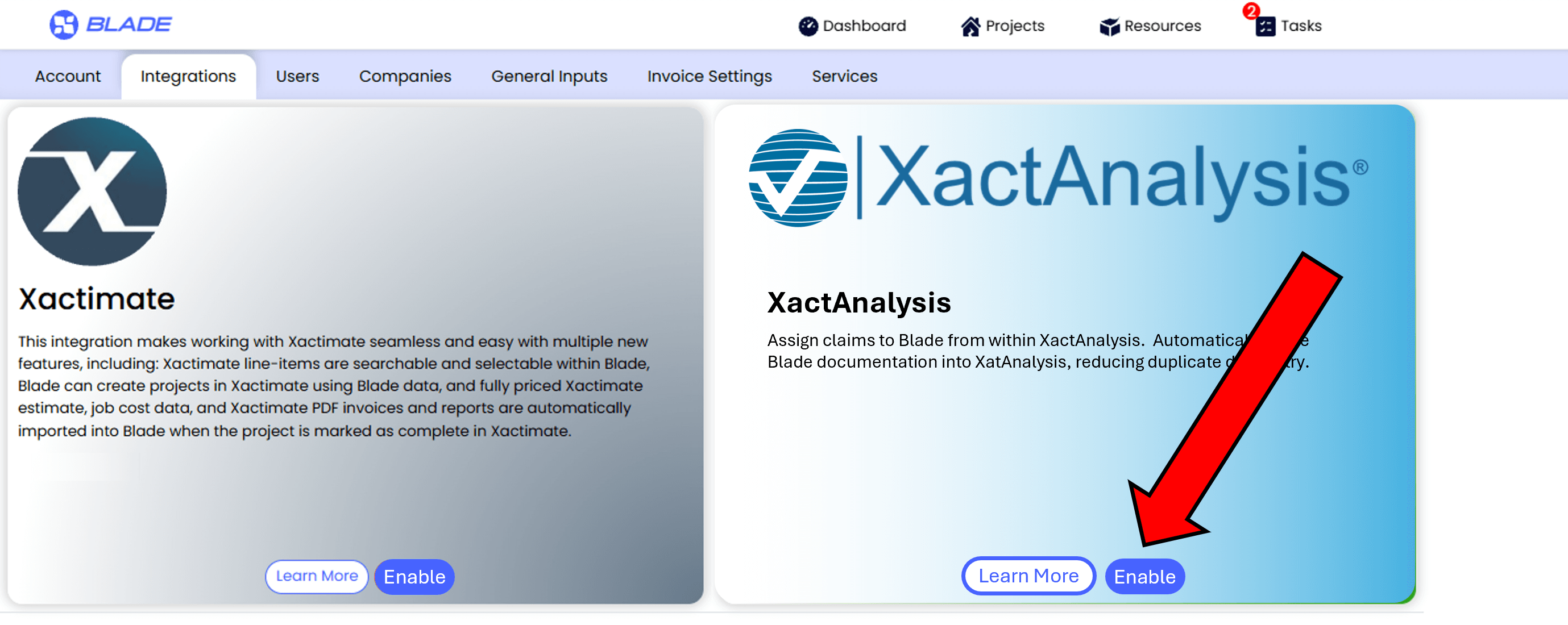
- Navigate to the Account Settings / Integrations page.
- Click on the Xactimate Enable button (The XactAnalysis and Xactimate Integrations are bundled into one)
- Complete the required permission document. To have the ability to make an assignment from
XactAnalsysis to Nomad Blade, you will need to sign a document granting your permission to Verisk to
move private data from Verisk platforms to Blade.
- After the permission form is submitted to Verisk, Verisk will enable "Nomad Blade" in your XactAnalysis
instance as a selectable assignee.
2. What Does the XactAnalysis Integration Do?
- Assign claims to Blade from within XactAnalysis.
- Automatically move Blade documentation into XactAnalysis, reducing duplicate data entry.