'%20transform='translate(-788%20-146)'%3e%3cpath%20d='M20.7111%2010.7111C20.7111%2016.234%2016.234%2020.7111%2010.7111%2020.7111%205.18826%2020.7111%200.71111%2016.234%200.71111%2010.7111%200.71111%205.18826%205.18826%200.71111%2010.7111%200.71111%2016.234%200.71111%2020.7111%205.18826%2020.7111%2010.7111Z'%20fill='%234763FF'%20transform='matrix(1%200%200%201.05%20787.289%20145.253)'/%3e%3cpath%20d='M3.185%2011.6806C2.12333%2011.755%201.06167%2011.8615%200%2012%200.130556%2011.2428%200.236481%2010.4857%200.317778%209.72889%200.448333%208.52167%201.09333%207.69778%202.32278%207.66833%202.98944%207.64889%203.6563%207.63389%204.32333%207.62333%204.99%207.61333%205.28444%207.95278%205.27167%208.58111%205.26333%208.96111%205.25333%209.3413%205.24167%209.72167%205.21%2010.8917%204.63833%2011.5806%203.185%2011.68Z'%20fill='%23FFFFFF'%20transform='matrix(1%200%200%201.05%20791.111%20150.2)'/%3e%3cpath%20d='M8.48444%2011.5739C7.09667%2011.5361%206.49778%2010.8939%206.51278%209.70444%206.51778%209.00389%206.52148%208.30333%206.52389%207.60278%206.525%207.11278%206.45167%206.86111%206.24611%206.65611%206.05944%206.46889%205.81444%206.37667%205.29889%206.37778%204.31667%206.38%203.33426%206.38444%202.35167%206.39111%201.08389%206.40611%200.537778%205.71556%200.481111%204.40667%200.412859%202.92918%200.252174%201.45741-8.47711e-09-1.69542e-08%201.77444%200.231667%203.54889%200.373889%205.32333%200.426667%206.48056%200.461111%207.30667%201.28%207.29111%202.29611%207.28611%202.99667%207.28241%203.69722%207.28%204.39778%207.27889%204.78944%207.35167%205.13944%207.55778%205.34444%207.74444%205.53167%207.97889%205.62389%208.505%205.62278%209.48722%205.62056%2010.4696%205.61611%2011.4522%205.60944%2012.8106%205.58056%2013.2661%206.28611%2013.3228%207.59667%2013.391%209.07342%2013.5517%2010.5444%2013.8039%2012.0011%2012.0306%2011.77%2010.2574%2011.628%208.48444%2011.575Z'%20fill='%23FFFFFF'%20transform='matrix(1%200%200%201.05%20791.111%20150.2)'/%3e%3cpath%20d='M11.4817%204.33167C10.8144%204.35111%2010.1474%204.36611%209.48056%204.37667%208.87167%204.38556%208.52%204.05611%208.53222%203.42722%208.54056%203.04389%208.55056%202.66074%208.56222%202.27778%208.59333%201.09222%209.28944%200.412222%2010.6189%200.319444%2011.6804%200.245%2012.742%200.138519%2013.8039%200%2013.6733%200.757222%2013.5674%201.51426%2013.4861%202.27111%2013.3489%203.56333%2012.8794%204.29556%2011.4811%204.33167Z'%20fill='%23FFFFFF'%20transform='matrix(1%200%200%201.05%20791.111%20150.2)'/%3e%3c/g%3e%3c/svg%3e) BLADE
BLADE 
1. How Do I Enable Xactimate?
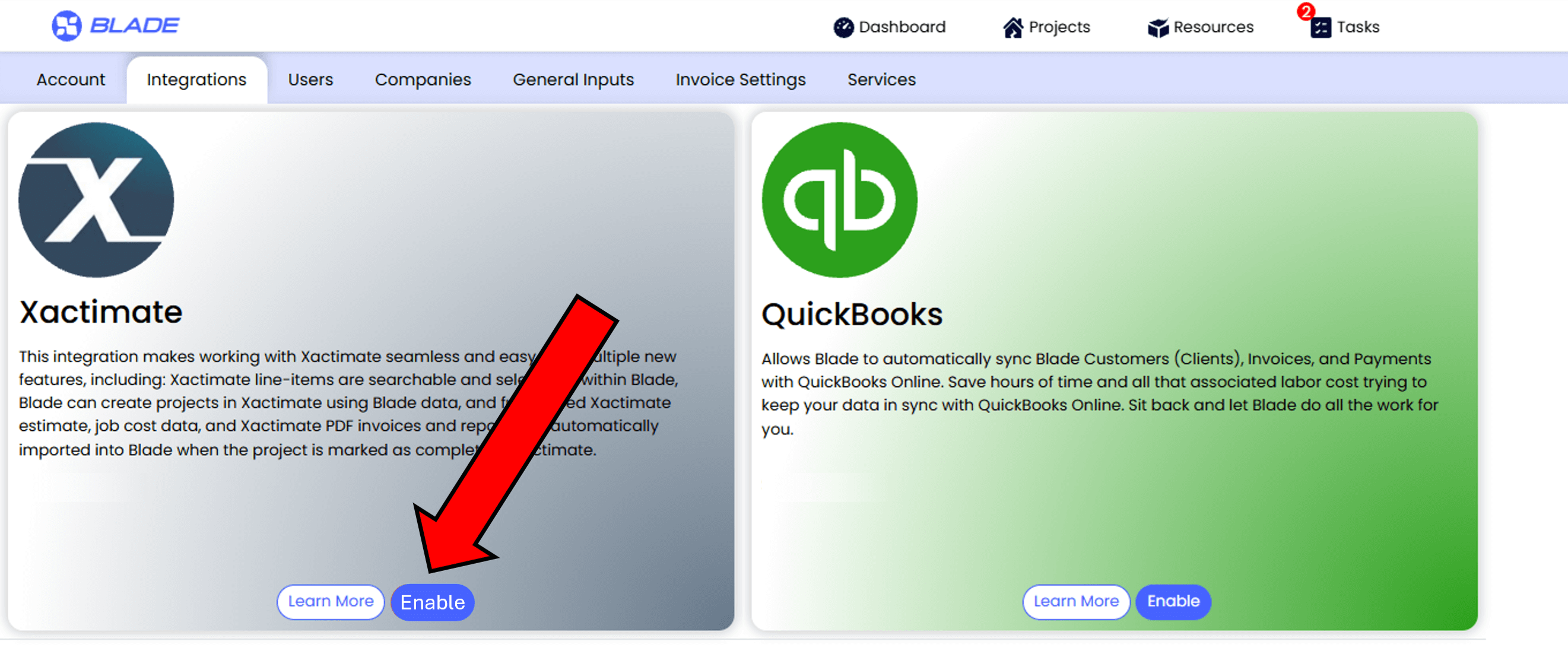
1. Go to pricing to signup for any Blade subscription. Simply click the Enable Xactimate button when prompted during onboarding!
2. Log in to Blade. Account Administrators can navigate to Account Settings, select the Integrations tab, and click the 'Enable' button on the Xactimate tile.
2. What Does the Xactimate Integration Do?
Write a job scope, or record
supplies-consumed, equipment-used, and work-performed at the jobsite using Xactimate line-items.
Blade heavily pre-filters and intelligently tags thousands of possible Xactimate line-items to make them
easy to seach and select. Applicable line-items are presented to technicians in a clean, searchable
format that makes sense in real jobsite conditions.
Users who are completely unfamiliar with Xactimate can easily and accurately record detailed scopes of
work each day at the jobsite, aided by Blade's integrated automation features.
Blade job
and scope data flows directly into Xactimate and is instantly transformed into an Xactimate project with
a fully priced estimate, saving you hours of time entering duplicate data on both platforms.
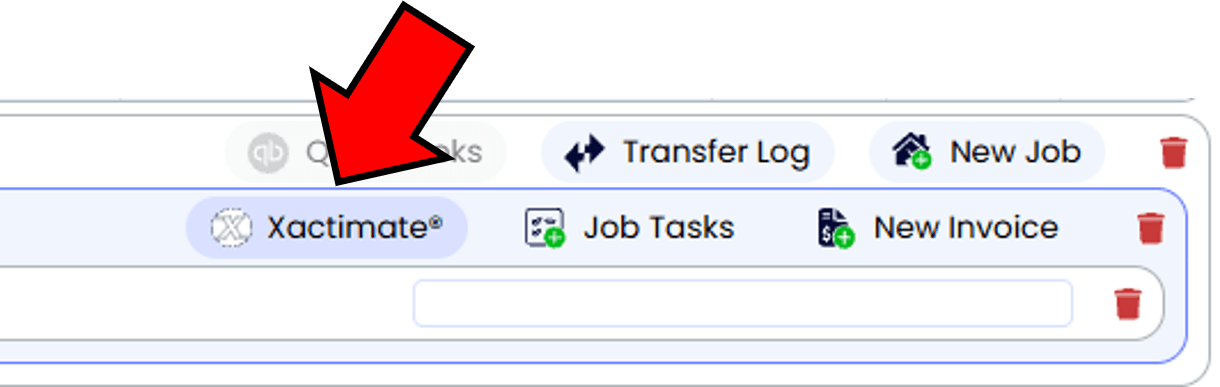
Each job in Blade displays an Xactimate button. An uncolored Xactiamate icon indicates an assignment
has not been made. Click the button to create an assignment and project in Xactimate.
A dialog will open. Simply select the desired Xactimate recipient and then click the Assign button. The fully priced Xactimate estimate, job cost data, and Xactimate PDF invoices and reports are automatically imported into Blade when the project is marked as complete in Xactimate.
3. How Much Does the Integration Cost?
This integration charges $4.15 per job that is synced with Xactimate. All jobs will need to be synced manually to Xactimate when they are ready on Blade. For more information on how to use this integration, see out training material.
4. Is an Xactimate Subscription Required?
Yes. You will need an Xactimate subscription and at least one XactNet Address to sync projects between platforms.
Learn more about the Xactimate integration on Blade’s Support Center Help page!